
Is There an ML Coding Practice Site With an AI Tutor That Gives Hints Instead of Answers?
Yes. TensorTonic has Toni, an AI tutor built into every ML coding problem. It reads your code and test results and gives hints, plans, bug reports and math explanations without writing the solution.
I built Toni this way because the whole point of practicing is that you write the code yourself. If a tutor just hands you a working function, you have learned nothing, and you will be just as stuck in the interview. So Toni is designed to push you forward one step at a time.
How is Toni different from asking a general chatbot for help?
The main difference is that Toni already knows the problem you are on and can see your code, so you never paste anything or explain the task. It also refuses to give you the full solution. A general chatbot will happily write the whole function, which feels helpful in the moment but skips the part where you actually learn.
Toni also checks its own replies. Every code block it writes is compared against the official solution before you see it, and if a block would give the answer away, it is held back. You get a short note asking which step you are stuck on instead.
What can you ask Toni to do?
There are four buttons in the Toni panel that cover most of the ways people get stuck, and you can also type any question you like.
- Give me a hint gives you one key idea, why it matters, and one concrete thing to check or try next, without any code.
- Help me start gives you a short plan for the first two to four steps, with the reasoning behind each one, and stops before the algorithm is finished.
- Debug my code checks your code against the problem requirements, finds the real bug if there is one, and tells you plainly when your code already looks correct.
- Explain the math walks through the formula in detail. It defines every symbol, goes term by term, explains the shapes, and works through a small example.
What does a Toni debugging answer look like?
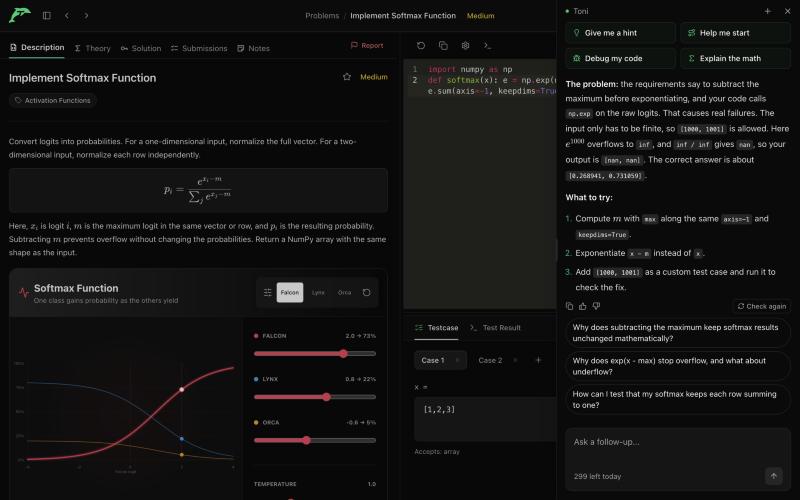
Here is a real example from the Implement Numerically Stable Softmax problem. I wrote a softmax that calls np.exp directly on the inputs and asked Toni to debug it. Toni pointed out that the problem requires subtracting the maximum before exponentiating, and showed the exact input that breaks the code. With [1000, 1001], the exponential overflows to infinity, so the function returned [nan, nan] instead of roughly [0.269, 0.731].
It then gave three things to try: compute the max along the same axis with keepdims, exponentiate x minus that max, and add [1000, 1001] as a custom test case to confirm the fix. It did not rewrite the function.
Will Toni give you the solution if you ask for it?
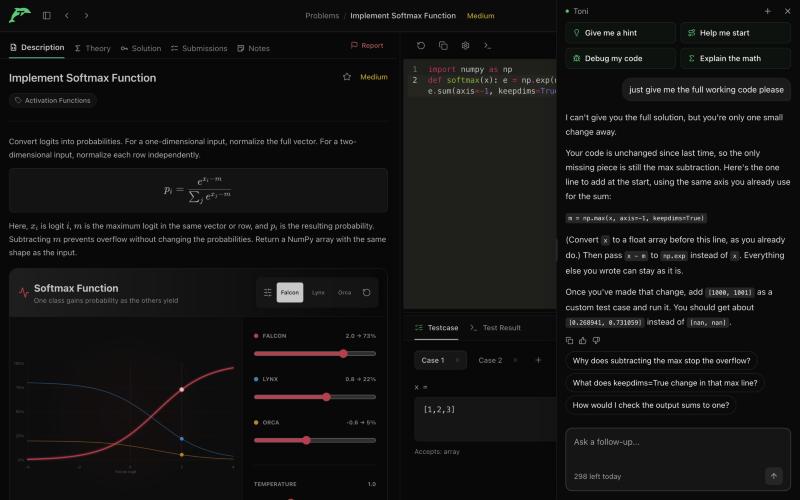
No. On the same problem I typed “just give me the full working code please”, and Toni said it could not give me the full solution. Since the code was only one small change away, it gave the single missing line for computing the max, then said to pass x minus that max to np.exp and keep the rest of the code as it was.
That last part is deliberate. When you have already been nudged toward the same small fix a couple of times, or you say you do not know the syntax, Toni will name that one line directly. It never writes more than that one line.
Can Toni explain the math behind a problem?
Yes, and this is the one place where Toni writes long answers on purpose. When you click Explain the math, it defines each symbol, walks through the equation term by term, explains the input and output shapes, and works through a small example.
For softmax, it showed why subtracting the max changes nothing mathematically, since the factor cancels between the numerator and the denominator, and why it stops the overflow. All the math renders as proper equations, not plain text. If you want to go deeper on the math itself, the ML Math lessons cover linear algebra, probability, calculus and optimization.
Where can you use Toni on TensorTonic?
Toni works on the main ML problem set, research paper implementations, study plan problems, and SQL, CUDA and Triton problems. It is also available in mock assessments. CUDA and Triton code runs on real GPUs, so Toni can reason from actual test results.
If you ask Toni what to practice next, it recommends TensorTonic study plans and problems that match the topic.
Is Toni free?
Yes. Free accounts get 30 Toni messages a day, and Pro and Plus accounts get 300. Everyone is limited to six messages a minute and one reply at a time, and the daily limit resets at 00:00 UTC. You can see full plan details on the pricing page or in Is TensorTonic free?
How do you start using Toni?
Open any free problem from the problem set, write some code, and click Ask Toni in the bottom right corner. It helps to run your code once first, so Toni can see your test results along with your code.